2017.01.14 - posted in macOS
Should you ever need a tftp server on your macOS device, you can use the builtin tftp server:
sudo launchctl load -F /System/Library/LaunchDaemons/tftp.plist
sudo launchctl start com.apple.tftpd
The tftp root folder is /private/tftproot
The file /System/Library/LaunchDaemons/tftp.plist holds the configuration.
Stopping the tftp server is as easy as:
sudo launchctl unload -F /System/Library/LaunchDaemons/tftp.plist
‘Tested and approved’ on macOS Sierra
2016.12.07 - posted in oneliners
Recently, I needed a file with a specific size. On a BSD or Linux machine, such a file can easily be created. The 50 in the oneliner below means that a 50MB file will be created:
dd if=/dev/zero of=test.img bs=1024 count=0 seek=$[1024*50]
2016.09.23 - posted in security
The report
Recently I decided to enable SSL for my blog. Of course, I checked the quality of my SSL settings, which weren’t too bad, but not A+ either:
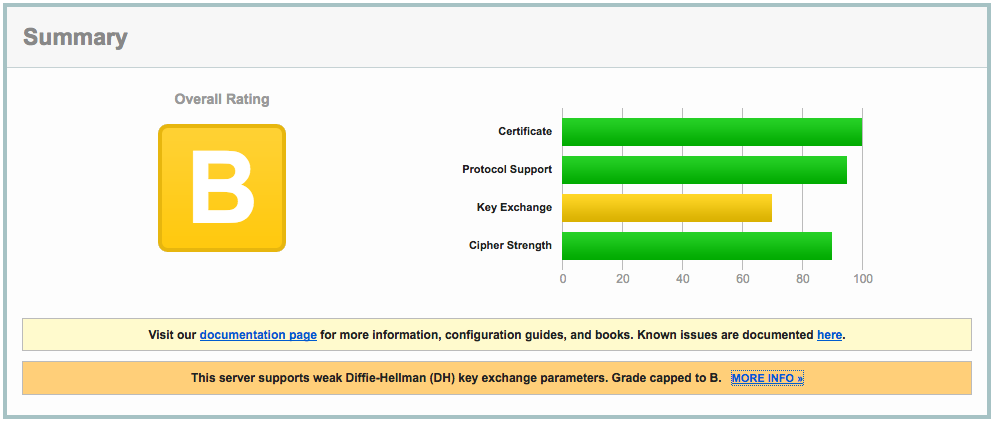
The clue is in the report:
This server supports weak Diffie-Hellman (DH) key exchange parameters. Grade capped to B.
The cause
The problem is explained in detail at https://weakdh.org. What it boils down to is that by default, a Diffie-Helman group of 1024 bits is generated, which is considered weak by today’s standards.
This is the main reason for the ‘B’ grade. Other SSL configuration parameters are important as well, so read on :)
The solution
Here’s how I remediated this problem. First, I created a 4096 bit DH group:
openssl dhparam -out /etc/ssl/certs/dhparams.pem 4096
The output would be something like:
Generating DH parameters, 4096 bit long safe prime, generator 2
This is going to take a long time
........................................................................................................................
<snip>
.........+.............................................................................................................++*++*
After generating the 4096 bit DH group, I changed the following parameters in the server block of my nginx vhost config:
server {

    ...

    ssl_ciphers 'ECDHE-RSA-AES128-GCM-SHA256:ECDHE-ECDSA-AES128-GCM-SHA256:ECDHE-RSA-AES256-GCM-SHA384:ECDHE-ECDSA-AES256-GCM-SHA384:DHE-RSA-AES128-GCM-SHA256:DHE-DSS-AES128-GCM-SHA256:kEDH+AESGCM:ECDHE-RSA-AES128-SHA256:ECDHE-ECDSA-AES128-SHA256:ECDHE-RSA-AES128-SHA:ECDHE-ECDSA-AES128-SHA:ECDHE-RSA-AES256-SHA384:ECDHE-ECDSA-AES256-SHA384:ECDHE-RSA-AES256-SHA:ECDHE-ECDSA-AES256-SHA:DHE-RSA-AES128-SHA256:DHE-RSA-AES128-SHA:DHE-DSS-AES128-SHA256:DHE-RSA-AES256-SHA256:DHE-DSS-AES256-SHA:DHE-RSA-AES256-SHA:AES128-GCM-SHA256:AES256-GCM-SHA384:AES128-SHA256:AES256-SHA256:AES128-SHA:AES256-SHA:AES:CAMELLIA:DES-CBC3-SHA:!aNULL:!eNULL:!EXPORT:!DES:!RC4:!MD5:!PSK:!aECDH:!EDH-DSS-DES-CBC3-SHA:!EDH-RSA-DES-CBC3-SHA:!KRB5-DES-CBC3-SHA';
    ssl_prefer_server_ciphers on;
    ssl_dhparam /etc/ssl/certs/dhparams.pem;

    ...
}
The nginx configuration can be checked with
Any problems with the configuration will be reported. If you’ve done it right, it shows something like:
nginx: the configuration file /etc/nginx/nginx.conf syntax is ok
nginx: configuration file /etc/nginx/nginx.conf test is successful
Make sure you include all configuration files the right way, otherwise you might be troubleshooting configuration that isn’t actually active at all!
After reloading nginx, all this resulted in the following report:
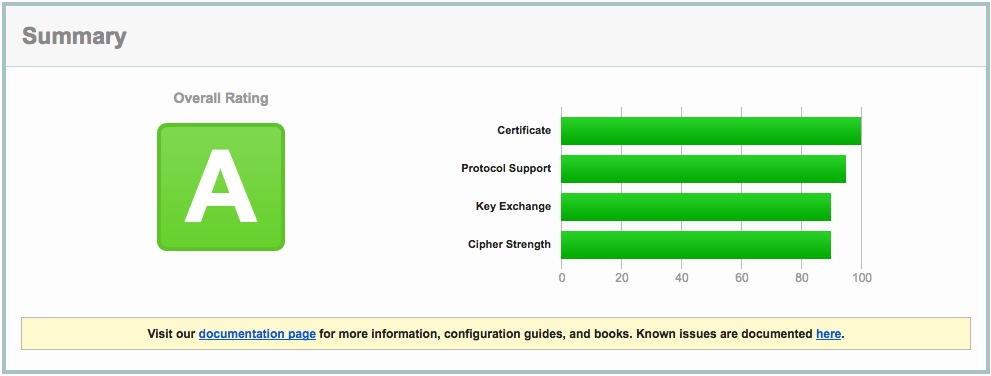
Close, but no sigar..!
A few more SSL settings need to be modified in order to get the A+ rating. So, I edited the nginx config again:
server {
    listen 443 ssl default_server;
    listen       [::]:443 ssl http2 default_server;

    ...

    ssl_certificate ""/etc/..../fullchain.pem"";
    ssl_certificate_key ""/etc/..../privkey.pem"";

    ssl_protocols TLSv1 TLSv1.1 TLSv1.2;
    ssl_prefer_server_ciphers on;
    ssl_ciphers ""EECDH+AESGCM:EDH+AESGCM:AES256+EECDH:AES256+EDH"";
    ssl_ecdh_curve secp384r1;
    ssl_session_cache shared:SSL:10m;
    ssl_session_tickets off;
    ssl_stapling on;
    ssl_stapling_verify on;

    add_header Strict-Transport-Security ""max-age=63072000; includeSubdomains"";
    add_header X-Frame-Options DENY;
    add_header X-Content-Type-Options nosniff;

    ssl_dhparam /etc/ssl/certs/dhparams.pem;

    ...
}
Which resulted in A+ (yay):
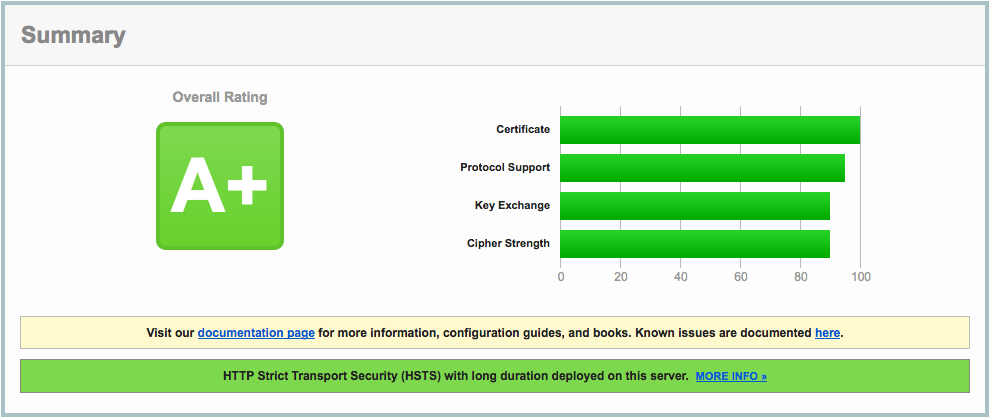
A lot of information about these nginx settings can be found here: https://raymii.org/s/tutorials/Strong_SSL_Security_On_nginx.html and here: https://cipherli.st.
Mitigating TLS-FALLBACK-SCSV would be possible, if it weren’t for the openssl version on CentOS 7, which is 1.0.1e. OpenSSL 1.0.1 has TLSFALLBACKSCSV in 1.0.1j and higher though.
2016.09.20 - posted in Linux
- log in to your CentOS 7 installation
- disable firewalld
systemctl stop firewalld
systemctl mask firewalld
- install the iptables-services package
yum install iptables-services
- enable the services at boot-time
systemctl enable iptables
systemctl enable ip6tables
systemctl start iptables
systemctl start ip6tables
- save the iptables configuration
service iptables save
service ip6tables save
- the configuration can now be found in the file
/etc/sysconfig/iptables
2013.09.10 - posted in Asterisk
Quick note-to-self, which I should’ve elaborated on in hindsight.
voip>dahdi show status
Description                              Alarms  IRQ    bpviol CRC4   Fra Codi Options  LBO
Wildcard TE121 Card 0                    OK      1      -1     -1     CCS HDB3 CRC4     0 db (CSU)/0-133 feet (DSX-1)
voip>pri show span 1
Primary D-channel: 16
Status: Provisioned, Up, Active
Switchtype: EuroISDN
Type: CPE
Remote type: Network
Overlap Dial: 0
Logical Channel Mapping: 0
Timer and counter settings:
N200: 3
N202: 3
K: 7
T200: 1000
T201: 1000
T202: 10000
T203: 10000
T303: 4000
T305: 30000
T308: 4000
T309: 6000
T312: 6000
T313: 4000
T316: -1
N316: 2
T-HOLD: 4000
T-RETRIEVE: 4000
T-RESPONSE: 4000
T-STATUS: 4000
T-ACTIVATE: 10000
T-DEACTIVATE: 4000
T-INTERROGATE: 4000
T-RETENTION: 30000
T-CCBS1: 4000
T-CCBS2: 2700000
T-CCBS3: 20000
T-CCBS4: 5000
T-CCBS5: 3600000
T-CCBS6: 3600000
T-CCNR2: 10800000
T-CCNR5: 11700000
T-CCNR6: 11700000
Q931 RX: 25186
Q931 TX: 20362
Q921 RX: 286934
Q921 TX: 286201
Q921 Outstanding: 0 (TEI=0)
Total active-calls:2 global:1
CC records:
Overlap Recv: No
voip>dahdi show channel 1
